📍 Drop a Marker v3.3 — press B while the song plays to drop a marker, then loop any stretch between two of them. Markers mode is the new default.
Add LoopingTube to your home screen for an app-like practice session.
Practice guide · Updated 2026-09-16
Slow Down Any YouTube Video Without Changing the Pitch
LoopingTube is a free YouTube slow downer built for practice. Play any video from 0.25× to 2× speed with the pitch unchanged, loop only the bar you're stuck on, and let a tempo ramp bring it back up to full speed while you keep playing. Nothing to install, no account needed.
How to slow down part of a YouTube video
- 01
Open the video
Paste a YouTube link into the box on the LoopingTube home page, or put loopingtube.com/ in front of the link in your address bar.
- 02
Mark the passage
Play the video and press I where the tricky part starts and O where it ends. Drag the handles or use the nudge buttons to trim it exactly.
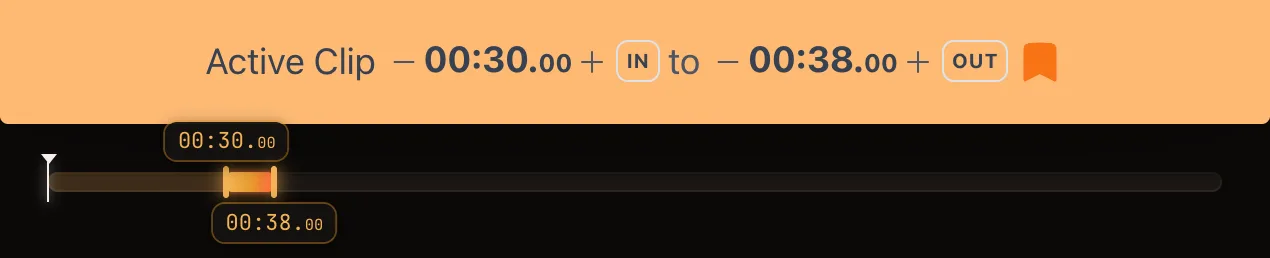
Fine-tune with the − / + buttons or drag the handles. - 03
Pick a slower speed
Move the speed slider down — it goes from 0.25× to 2× in 5% steps. Around 0.60×–0.75× is a good starting point for most passages.
- 04
Loop it
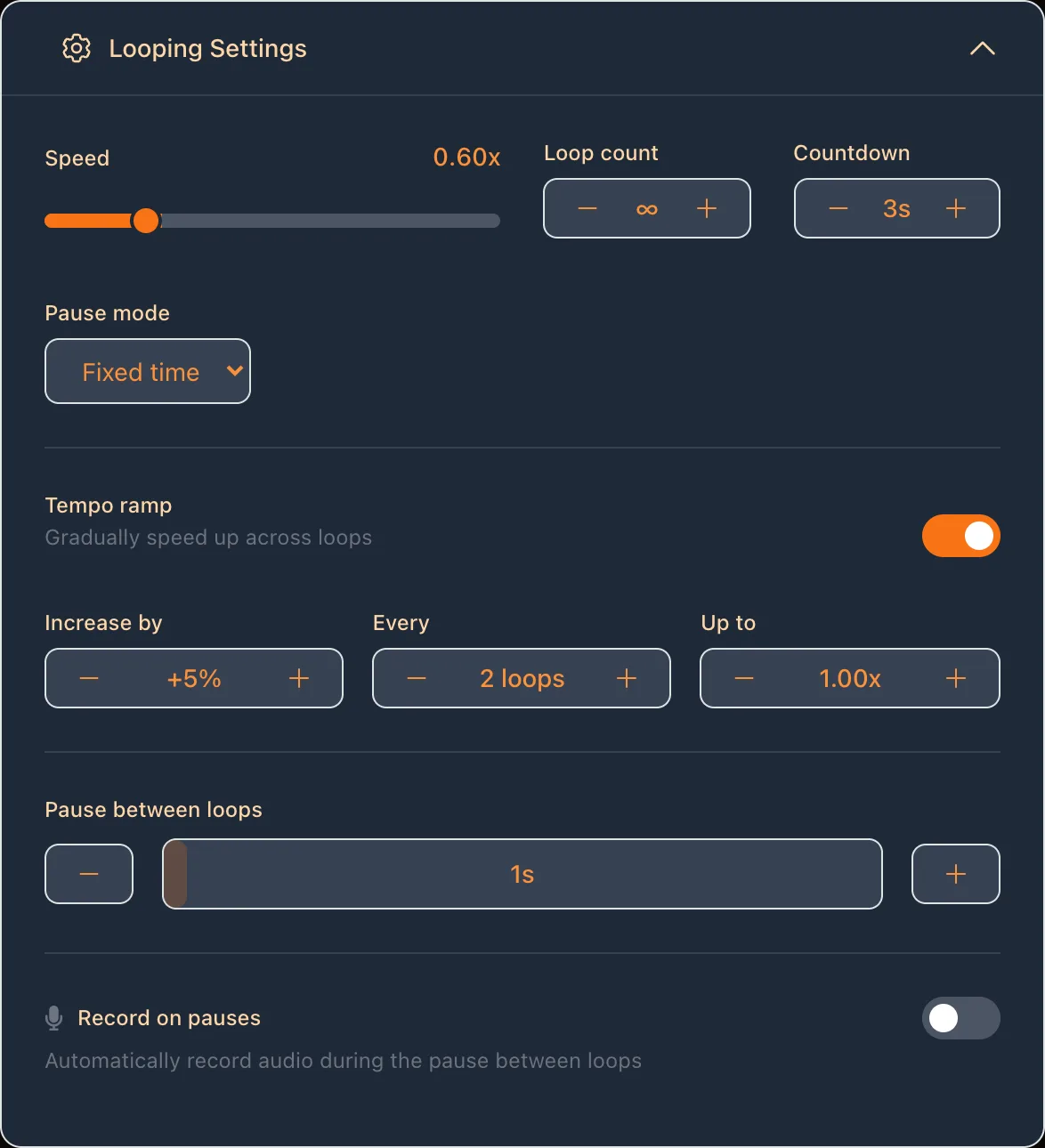
Press E to start looping. The passage repeats at the slower speed, with an optional countdown before it starts and a pause between repeats.
- 05
Ramp back up to tempo
Turn on the tempo ramp in the loop settings, choose how much to speed up (for example +5%), how often (every 2 loops) and the target speed (1.00×). The speed climbs on its own while you play.
Slow practice, then speed: the tempo ramp
Teachers give the same advice for every instrument: play a hard passage slowly enough to get it right, then raise the tempo in small steps. Doing that by hand means stopping every few repeats to change the speed. LoopingTube's tempo ramp does it for you.
Say a guitar solo's fast run falls apart at full speed. Loop the run, start at 0.60×, and set the ramp to +5% every 2 loops with a target of 1.00×. You'll play it twice at 60%, twice at 65%, and so on — reaching full speed after 16 repeats without taking your hands off the instrument. The ramp never goes past the target, and when you stop the loop the speed goes back to where you started, ready for the next round.
Want to push past full speed so the real tempo feels easy? Set the target above 1.00× — up to 2×.
Why the pitch stays the same
Old tape and record players slowed music by spinning slower, which also dropped the pitch — a song at half speed came out an octave lower. Modern browsers use time-stretching instead: they keep the pitch and spread the sound over more time. So when LoopingTube plays a video at 0.70×, the song is still in its original key and you can play along in tune.
Time-stretching has limits. Down to about half speed, most music sounds clean. Slower than that, drums get softer attacks and long notes pick up a slight echo — still perfectly usable for working out which notes are being played, just not pretty.
LoopingTube vs YouTube's own speed setting
| Feature | LoopingTube | YouTube |
|---|---|---|
| Slow down without changing pitch | ✅ | ✅ |
| Speed range | 0.25×–2× in 5% steps | 0.25×–2× |
| Loop just one section | ✅ | ❌ Whole video only |
| Gradual tempo ramp | ✅ | ❌ |
| Pause and countdown between repeats | ✅ | ❌ |
| Stop after a set number of loops | ✅ | ❌ |
| Save several sections per video | ✅ | ❌ |
| Record yourself over the loop | ✅ | ❌ |
| Share your sections as one link | ✅ | ❌ |
YouTube's speed menu is fine for watching a tutorial a bit slower. For practice, the missing piece is repetition: slowing a whole five-minute video down doesn't help when you need the same four bars fifty times.
LoopingTube vs slow downer apps
Dedicated slow downer apps such as Amazing Slow Downer, Transcribe! and Anytune have been around for years. They're installed apps that work on audio files on your device, and they're the better choice if you need to change a song's key, EQ out an instrument, or practice from recordings that aren't on YouTube. Most have paid versions.
LoopingTube is the quicker option when the song, lesson or performance you're learning is already on YouTube — which covers most tutorials, live versions and play-alongs. There's no file to find or import: paste the link, loop the passage, slow it down. It runs in the browser on any computer or phone, and your saved sections follow you if you sign in.
Practice ideas by instrument
Guitar and bass. Loop a solo phrase by phrase at 0.50×–0.70× to catch every bend, slide and hammer-on, then save each phrase as its own clip and jump between them with N and P.
Piano and keys. Slow a tutorial's hand-position shots down to follow the fingering, and use the pause between loops to reset your hands before each repeat.
Drums. Loop a fill at a slower speed with a countdown before each repeat, then ramp up until you can drop it into the full groove.
Singing and learning by ear. Slow a fast run or a melisma down to hear each note — the pitch stays put, so you can match it — and record yourself over the loop to compare.
Dance. Break a choreography video into counts, slow each section down and speed it up as the moves stick.